The Local CAM series tells the story of writing this. This page is the short version, for someone who might want to run it.
What it is
CAM software plans the route a spinning cutter takes through a block of material, and how fast and how deep it goes at every point. That route is the toolpath. A post-processor turns it into G-code, the plain list of moves a CNC mill reads. This is a CAM program and a post-processor, written from scratch, that run on your own computer with no account and no connection.
Bolted to it is a simulator that reads the finished G-code back — not the plan, the file the machine will actually run — and carves a model of the block move by move. What it shows is what the mill will do. It also checks the file for the mistakes that break cutters: a fast move into material, a plunge deeper than the cutter can take, a feed outside the cutter’s range, a shank meeting the block.
There is a CAD half as well — CAD being the drawing of the part itself, before anything works out how to cut it. Here the part is not clicked together in a drawing program; it is written as code, which means it can be measured, tested and rebuilt the way software is. The last two sections are about that half, and it scales further than the milling does.
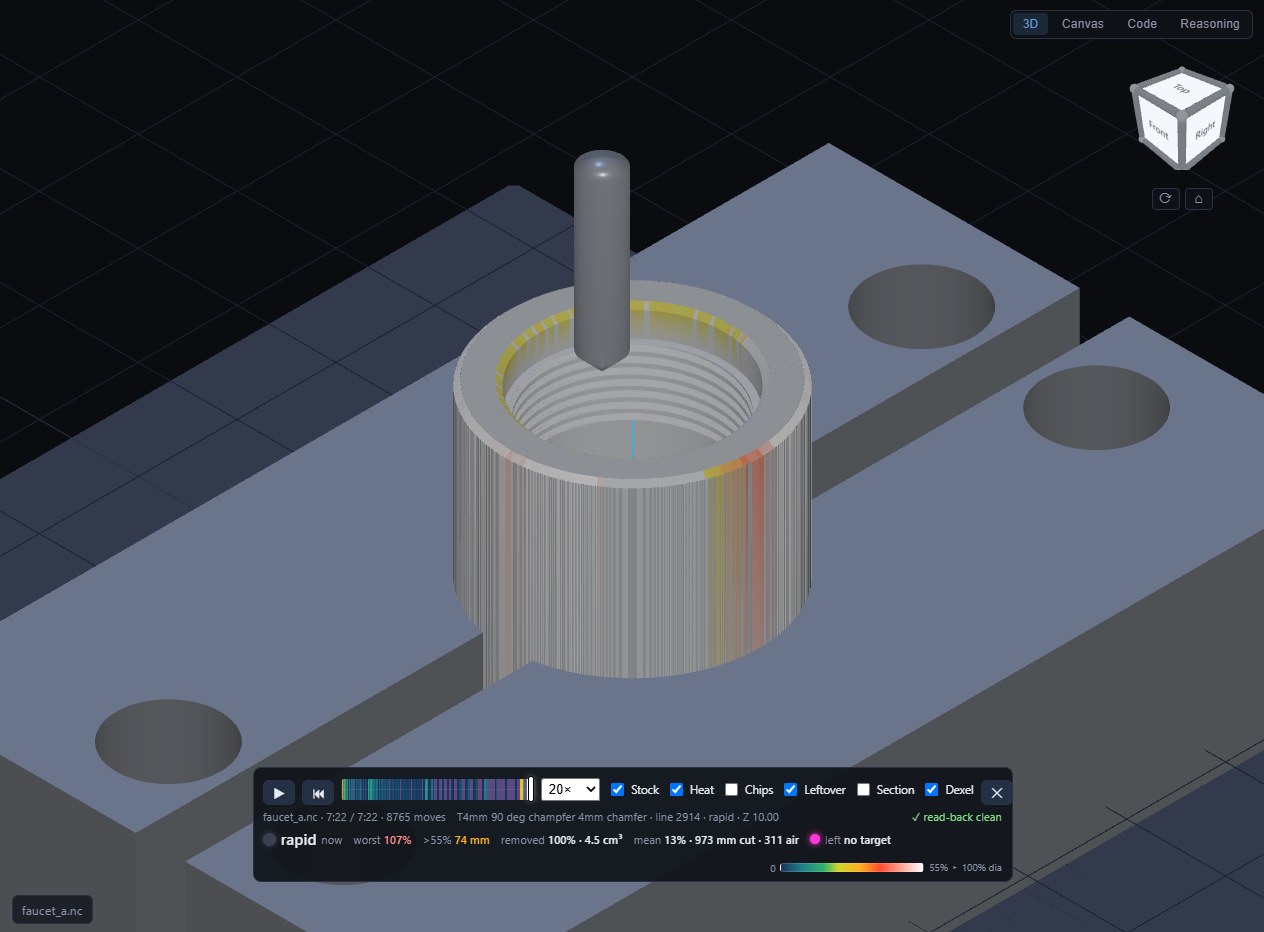
The simulator’s model of a threaded bore for a faucet part, after the last pass. Every groove of the thread was carved from the G-code file, move by move, not drawn from the design. This part has not been cut yet.
The thread being cut. A thread mill orbits inside the bore, and the panel at upper left is a slice through the middle of the block: the thread’s teeth appear in the wall as the passes go by. The faucet part’s test piece, in plastic, not yet cut on the mill.
What it does today
- Cuts recesses, outlines and flat faces, one cutter per job, on a three-axis mill.
- Reads the G-code back and grades it: cut time, how hard the cutter is working at every point, material removed, and a pass or fail on each check above.
- Has cut real material: five runs so far on a benchtop mill, four in plastic and one in aluminium. Each run was measured with calipers and used to find the next bug.
- A thread-milling pass exists and passes the simulator. It has not cut metal.
The file that cut the first test piece, played back. The recess is cleared one depth at a time; magenta marks material still standing above the finished floor. The red flag in the readout is a check written after that cut: the file never tells the controller to stop sharp at corners, and a later test piece came off the mill with uneven corners because of it.
A cutter spiralling down to open a bore for the same faucet part. The coloured bands are its path, shaded by how hard the cutter is working at each point.
Describe it in words
The simulator sits inside a small design tool with a chat box. Type what you want, and a language model running on my own hardware writes the part as code, builds the 3D model, plans how to mill it, and hands the G-code to the simulator. It then runs its own checks on what it made and says which ones failed.
One real request, start to finish: a plastic block with a rectangular recess. The model plans first (the scrolling text), writes and builds the part, then the simulator cuts the recess from the file it produced. The thinking stretch is sped up; the stamp shows real time, about four minutes in all. Two of its checks complain. One is a bug in a checker that read “40 mm” as a cube. The other is real: the model never said what material the block was, so the software assumed aluminium and warned that it has no proven feeds for aluminium.
It is not reliable yet. On the same request phrased with a round recess, it placed the recess by its centre where the format wants a corner, and a check refused to make a toolpath at all. That is the point of the checks.
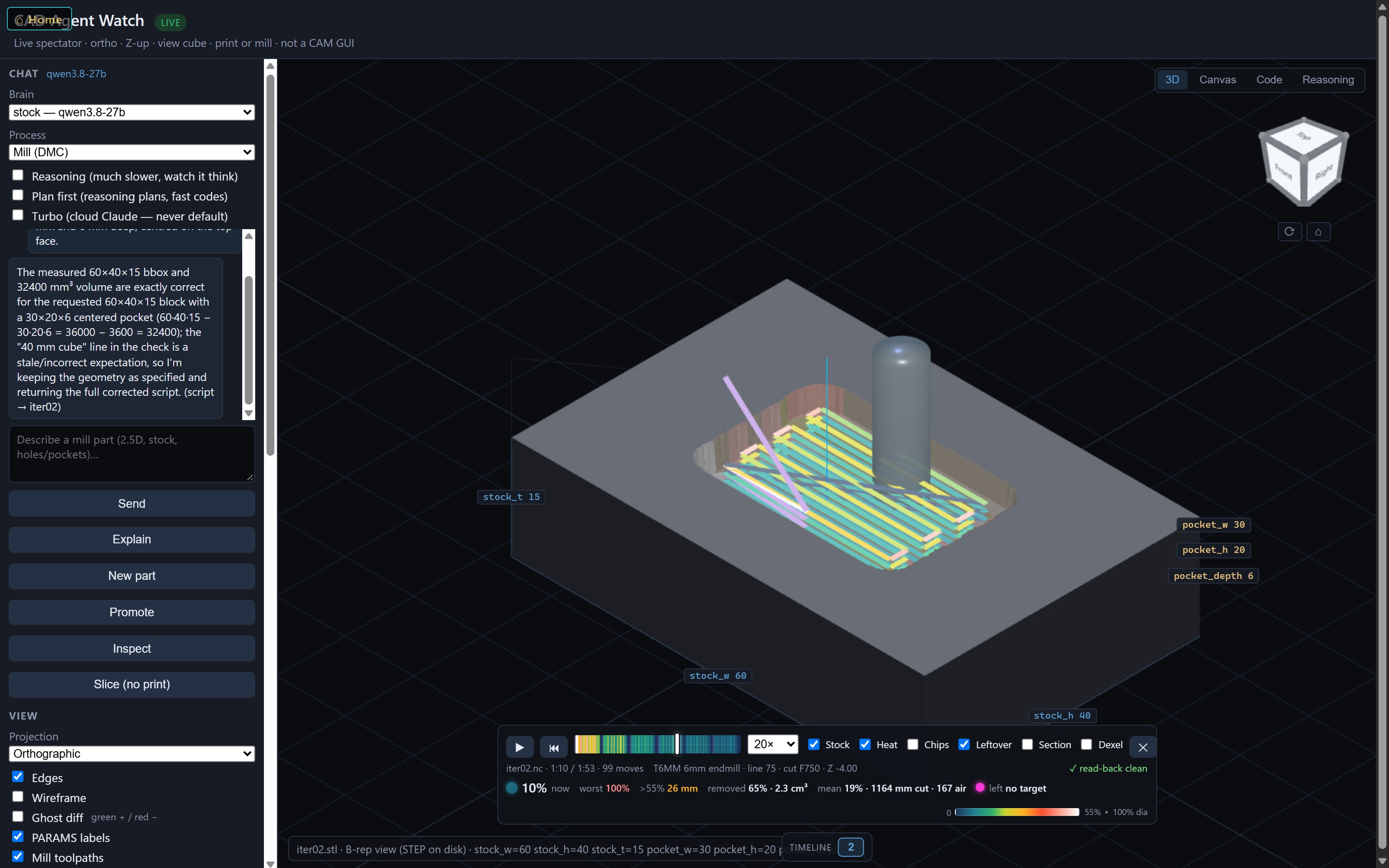
The whole tool on one screen, part-way through the cut. Click the picture for the full-size version, which you can zoom into.
There is also an Explain button. It asks the model to say why it built the part the way it did.
Pressing Explain on the same block. The answer is headed as an after-the-fact justification, not a record of the model’s thinking, and it is right to say so: it describes the part correctly but calls the milling plan “inert code”. That plan is what the mill cuts from.
It makes its own fixtures
A mill has to hold the part while it cuts. The faucet part is a short round bar standing on end, and the vise cannot grip that. So an AI coding assistant designed a pair of soft jaws: blocks that replace the vise’s hard jaws and have a curved saddle cut into them, shaped to fit the bar. It designed them as code, sliced them into a program for the 3D printer, and wrote the milling job that cuts the saddle into the printed pair while they sit in the vise, so the saddle lines up exactly with the mill. This was not the chat box above: a larger model wrote the jaws as code in the same system, and the same checks and simulator read its work.
The job that cuts the saddle, played back: a round seat for the bar, bored down through the join between the two printed jaws.
And whole machines, not just parts
A pair of jaws is a part. The same way of working scales up a long way: the biggest thing built with it so far is a seven-foot machine for wrapping tape around cabinet panels — 118 solid pieces, every flat one of them a file a CNC router can cut.
What makes it worth trusting is the direction the work flows. One script writes the cutting files. A second script reads those outlines and extrudes them into solids. Nothing is ever drawn twice, so the 3D model is not a picture of the machine — it is the cutting files given thickness. If the model says two parts collide, the files that cut them collide.
The model then tests itself, the way code does: solids sharing space, the shortest distance between every pair that must not touch, the weight of every piece, all re-run at each 15° of rotation. It plants a failure on purpose too — one wheel shoved a millimetre into the ring — because a test that has never failed has not been shown to work.
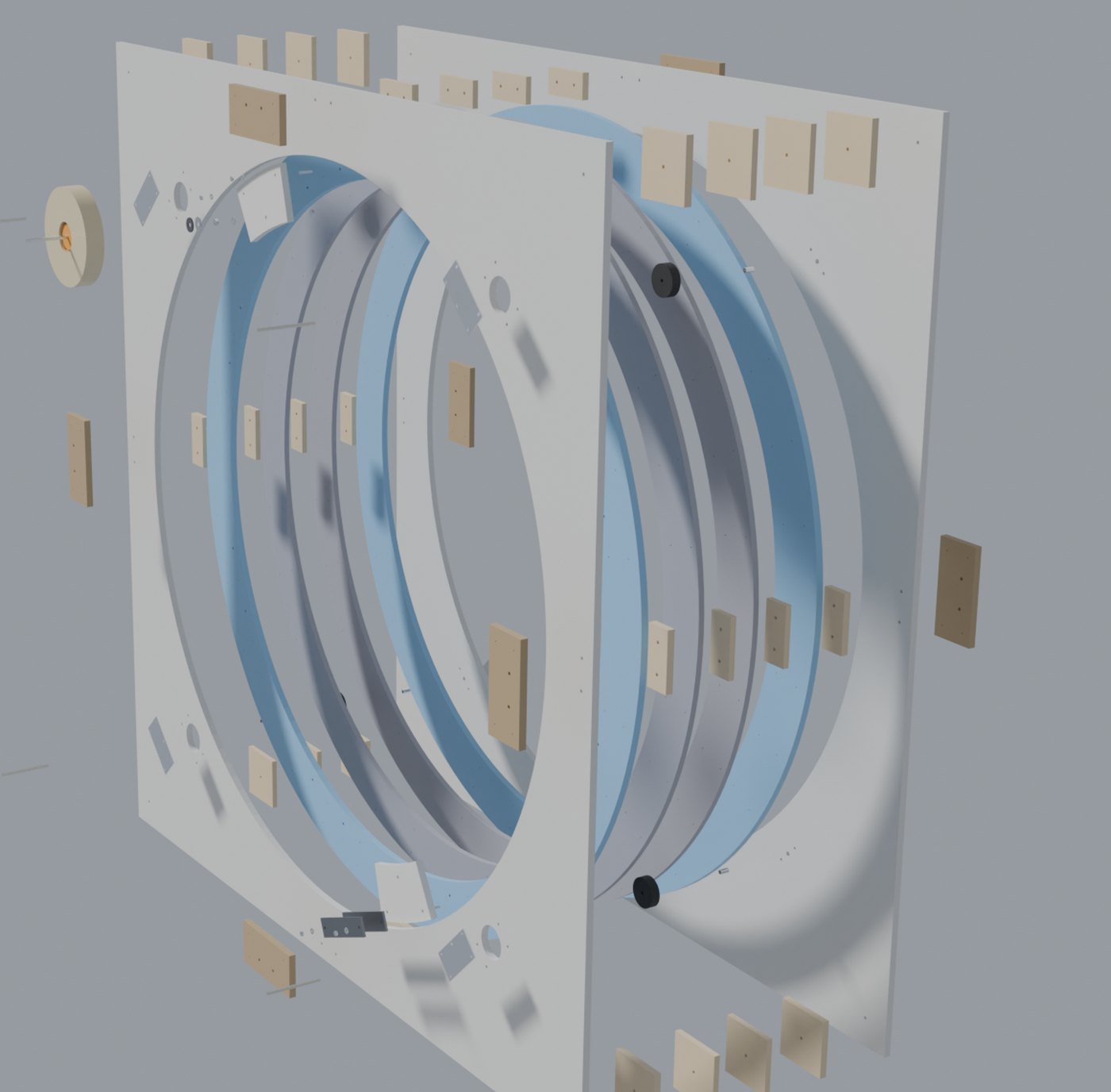
All 118 pieces, pulled apart. Nothing here was modelled by hand — every solid is one of the router’s cutting outlines, extruded to the thickness of the sheet it gets cut from.
It found real mistakes, including a part hanging off an edge, a clearance that was measuring the wrong corner, and a wheel that could not be taken out of the machine for replacement. It also missed some, and a person caught those. That story is its own page: The ring weighed twice the guess.
None of this was typed into the chat box above. It was written as code by an AI coding assistant, in the same system, checked by the same checks.
Where it isn’t
It has run on one machine, one controller and one person’s parts: mine. There is no installer, no manual, and no tool-changer support, because my mill has none. Every number in it was tuned on my cutters. Treat it as a workshop tool that works for its author, not a product.
The CAD half carries the same warning twice over. Writing a part as code is a good way to build something you can test, and a bad way to sketch: it is fast once the shape is decided and slow while it is still being argued about. The tape machine has been checked to death in software and not one piece of it has been cut, which is exactly the gap this whole page is about.
Still in testing
If you run a small mill and would like to try it, or you have written something like it and want to compare notes, email me: contact@justinlaviolette.com. Tell me what machine and controller you run. No download link, no price, no mailing list. A conversation first.